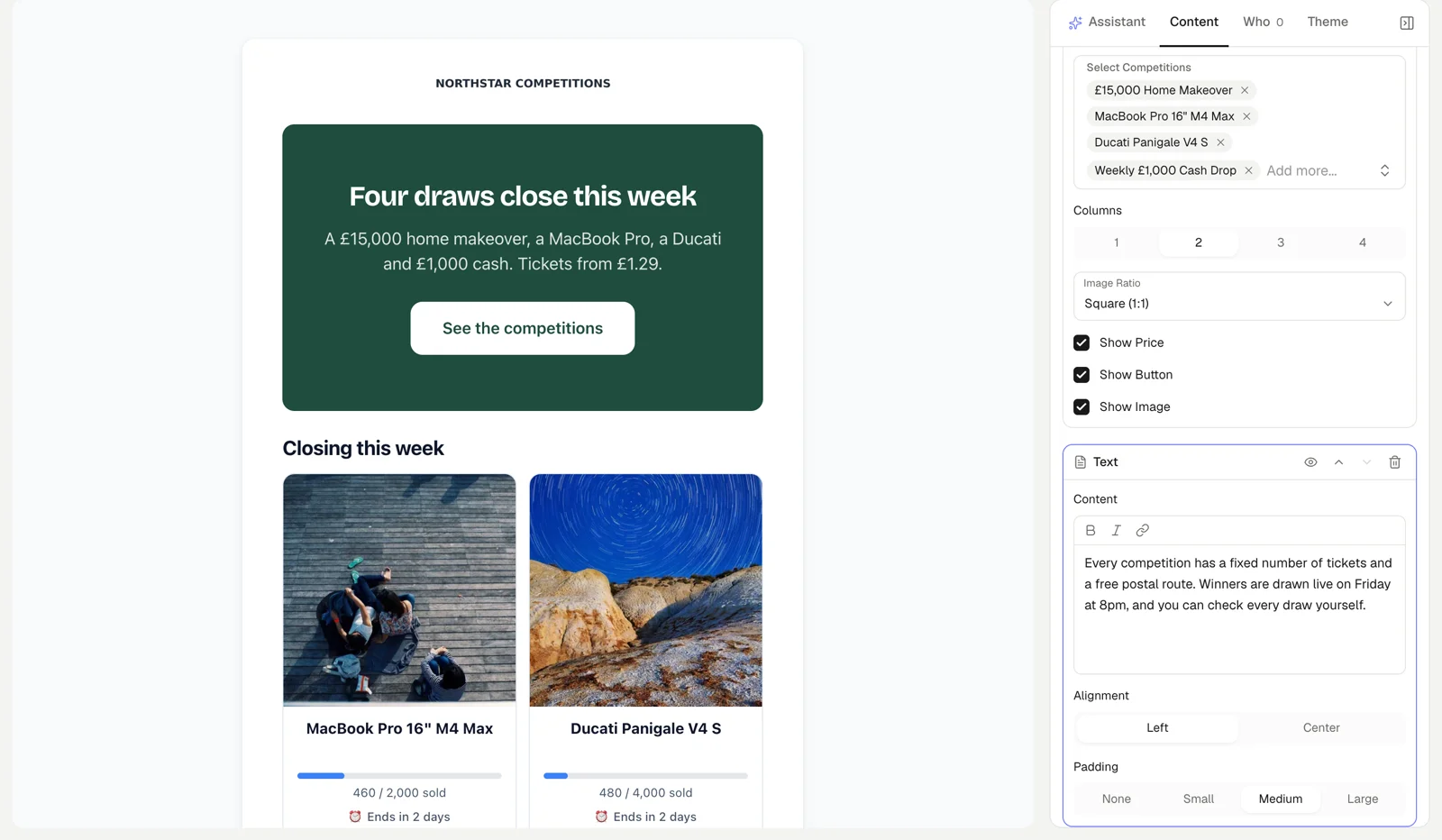
Basecomp has email marketing built in: design a campaign from blocks, list your live competitions in it, choose which customers get it, and send it now or on a schedule. Campaign emails cost £1 per thousand, with no list-size limit. Sign-up pop-ups, a website sign-up section and announcement bars grow the list, and a Klaviyo connection is there if you already use Klaviyo.
Card processing is billed separately by your payment provider at their own rates.
Under Marketing > Email Campaigns, build the email from Hero Banner, Text, Image, Competition Showcase, Button, Divider and Spacer blocks, typing straight into the email as it will look. A Competition Showcase block lists competitions you pick by hand or by category, with their price, picture and button. Preview it at desktop and mobile widths, and set your colours, font and corners on the Theme tab.
Ask the Assistant to write or rewrite the email, for example this week's drop email with your open competitions, or three shorter subject lines. Its answer lands in the editor as one step you can undo. It never saves, sends or changes who the email goes to.
Send to everyone who has agreed to marketing emails, or filter by smart tags (Repeat buyers, VIP customers, New customers, Inactive, Never purchased), your own customer tags, a minimum number of orders or a minimum spend. The count updates as you filter. Customers who unsubscribed, and addresses that bounced or complained, are always left out.
Send a test to up to 10 addresses, then send now or schedule it. To send from your own address, verify your domain in your email settings first.
Each sent campaign has a report with Sent, Delivered, Opened, Clicked, Bounced, Unsubscribed and Failed counts, and a per-recipient list you can filter and export. The campaign list shows each one's status, recipients and open rate.
Under Marketing > Banners & Pop-ups you can run an email sign-up pop-up, a message bar across the top of your site, or a bar that counts down to a competition's draw, each on its own schedule. You choose when a pop-up opens (after a few seconds, after scrolling, or when the visitor goes to leave) and how often. Pop-ups never open on checkout, account or sign-in pages, or over a live draw.
The website editor also has an Email sign-up section you can add to any page. Every sign-up gets a confirmation email before it counts, and the confirmed list is under Marketing > Subscribers, with where each sign-up came from, ready to export as CSV.
Connect Klaviyo under Settings > Integrations and Basecomp syncs your customer profiles and sends order, competition win, add to cart and favourite events as they happen, so you can build Klaviyo flows on them. You choose the Klaviyo list new customers join, and each event type has its own switch. Customers you already had before connecting are not backfilled from this page yet.
Campaign emails are £1 per thousand, charged to your saved card when the campaign sends. A campaign that costs under £5 is added to your monthly bill instead, which is charged once it reaches £5. Order, win and account emails are not charged.
Customers who have agreed to marketing emails from your store, narrowed by any filters you set. Unsubscribed, bounced and complained addresses are always left out.
Not yet. Subscribers who have never bought are kept in a separate list you can export. Campaigns go to customers who have agreed to marketing emails.
Yes. Connect Klaviyo in Settings > Integrations and your customers, orders and wins sync to it as they happen, so you can run flows and campaigns there.
Texts from your own sender name at 5p a part, with opt-outs and quiet hours built in.
A free game your customers play every day to win site credit, bonus plays or discount codes.
Customers share a link: friends get a first-order discount, referrers earn website credit.
The platform is free. Optional extras, priced plainly.
Create your free account. Campaign emails are £1 per thousand, and you pay only for what goes out.
Create your free account