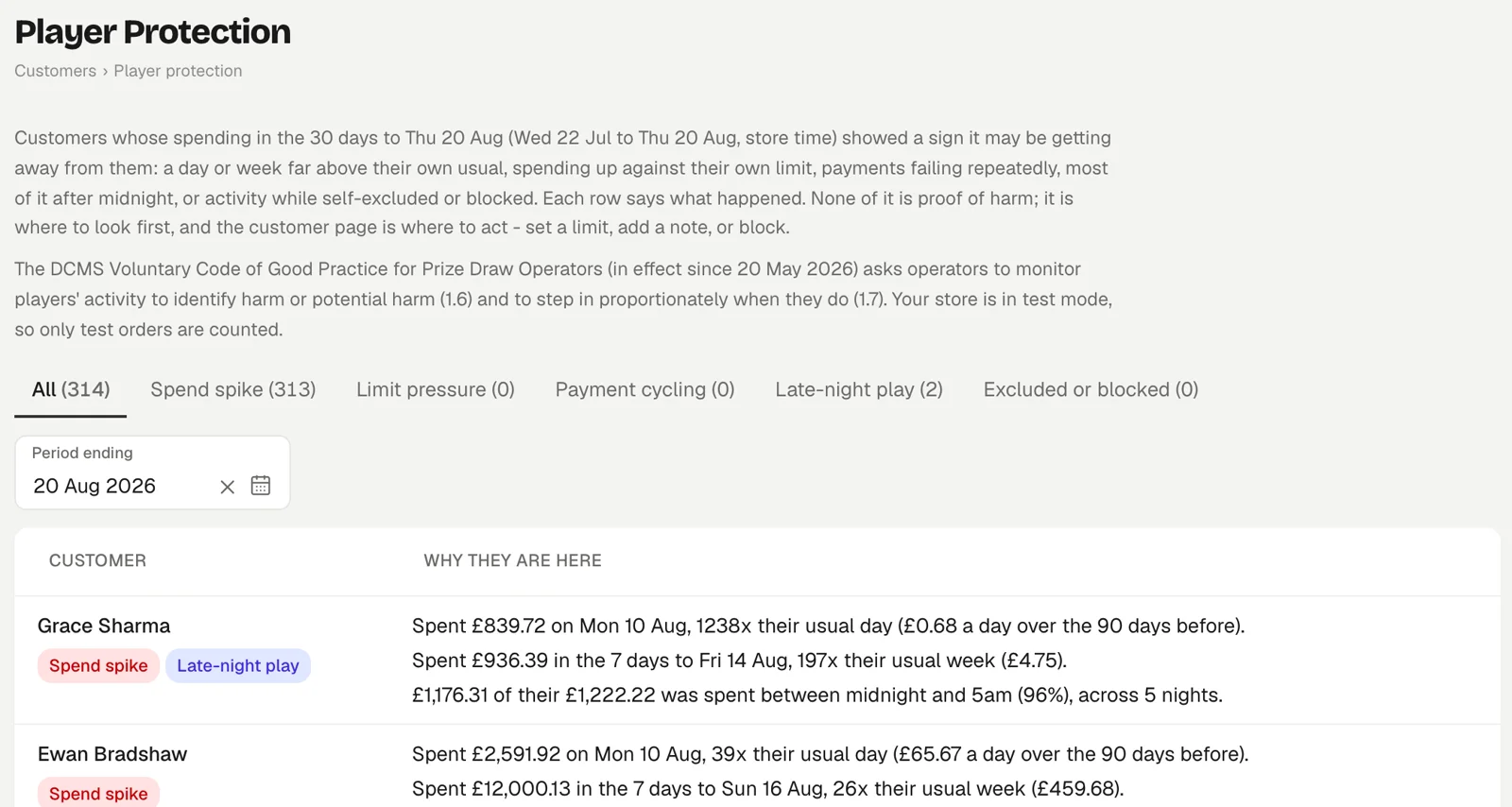
Every Basecomp store comes with player protection built in: customers can set their own weekly or monthly spend limit, take a 1 to 3 month break, and self-exclude for 6 months, 1 year or 5 years, entrants must give a date of birth showing they are 18 or over, and a player protection report flags customers whose spending may be getting away from them. You can set a spend limit on a customer, block them for a set time or for good, and keep notes of what you did.
Card processing is billed separately by your payment provider at their own rates.
Customers set their own spend limit, per week or per month, from the Security page of their account. Lowering it applies instantly. Raising or removing it needs a 24-hour cooling-off period before they can confirm. At checkout, an order that would take them past their limit is refused with a message showing what they have left.
You can set a default limit for every new account, a maximum no customer can set their own limit above, and a limit on any individual customer from their customer page.
A customer can take a break of 1, 2 or 3 months, or self-exclude from your store for 6 months, 1 year or 5 years, from the same Security page. They are signed out straight away and cannot buy tickets until it ends, and they cannot open a new account with the same email address. Their marketing emails and texts are switched off, they are left out of every campaign you send, and they are unsubscribed in Klaviyo if you use it. They can still sign in to see their tickets and claim prizes they already won. A break ends on its own. A self-exclusion cannot be cut short, and when its period is over it stays in place until the customer contacts you: you record the lift and it takes effect 24 hours later, as the PCC's minimum standards ask.
Customers > Self Exclusions lists every self-exclusion on your store, and a customer's page shows other accounts that share their phone number or email, to help you spot someone getting round an exclusion with a second account.
Customers give their date of birth when they create an account, at sign-up or at checkout, and anyone under 18 is refused. Before a prize is released, a winner whose date of birth is not on file confirms it. These are self-declared dates: if you want document checks for high-value prizes, you arrange those yourself.
Customers > Player Protection lists customers whose spending in the last 30 days showed a specific sign that it may be a problem. There is no risk score: each row says what happened, such as how much they spent on a day against their own usual day. None of it is proof of harm; it is where to look first.
From a customer's page you can set a spend limit, add an internal note of what you saw and any contact you made, tag them so you can find them again, or block them. A block can last until a date you pick, up to five years ahead, or have no end. A blocked customer cannot sign in or buy, and cannot get round it by registering again with the same email.
The DCMS Voluntary Code of Good Practice for Prize Draw Operators, in effect since 20 May 2026, asks operators to monitor players' activity for signs of harm and to step in proportionately when they see them. The player protection report is that monitoring, built in, and the spend limits, self-exclusion and blocks are the tools to act on it. Every store also gets a Responsible Play page draft that signposts GamCare, BeGambleAware and Gambling Therapy. This is general information, not legal advice.
How Basecomp approaches compliance →Yes. From the Security page of their account, per week or per month. Lowering a limit is instant; raising or removing one needs a 24-hour cooling-off period.
Only when they ask, and never early. Once the period they chose is over, a self-exclusion stays in place until the customer contacts you. You then record the lift on the Self Exclusions page and it takes effect 24 hours later. Neither you nor the customer can end it during the period itself.
Every customer gives a date of birth when they create an account, and anyone under 18 is refused. The dates are self-declared, so document checks for high-value prizes are up to you.
No. A self-exclusion applies to the store it was made on.
The spend limits, self-exclusion and age checks on every store, and where players can get support.
How Basecomp approaches UK prize competition rules.
A no-purchase-necessary route on every competition, with postal entries in the same draw.
Profit per competition, payout ratio, payment success and which competitions bring players back.
Create your free account. Spend limits, self-exclusion and the player protection report are on every store, at no cost.
Create your free account