Trustpilot: paste your TrustBox code#
In Settings › Integrations, paste the TrustBox embed code Trustpilot gives you and we fill in the IDs it needs, instead of you hunting for them.
Open integrations →Payment links and QR codes#
Create a link or QR code that opens checkout with tickets already in the basket, for live streams, DMs and events. Saved links get a short address you can point at a different competition later, and each one shows the sales it brought in.
Create a payment link →Banners and pop-ups#
Run announcement bars, draw countdowns and email sign-up pop-ups across your site, each on its own schedule, from Marketing › Banners & Pop-ups.
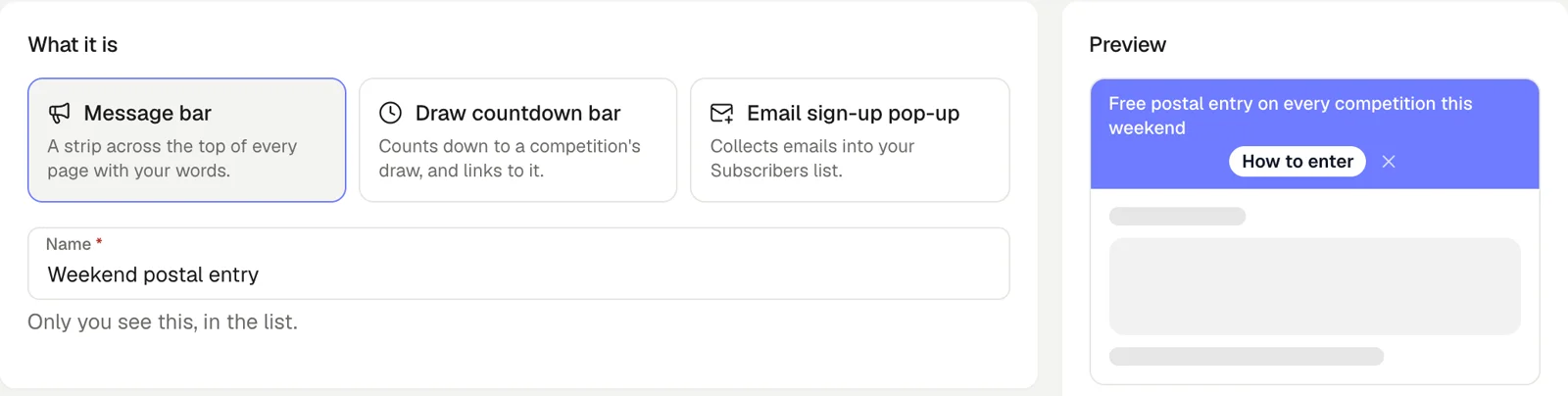 Create a banner →
A Halloween look for the daily game#
The creature battle daily game has a Halloween theme with its own soundtrack, ready for October.
Open the daily game →A new email campaign editor with a writing assistant#
Type straight into your email as it will look, upload pictures in place, and ask the writing assistant to draft or tighten your copy.
Open email campaigns →Bundle deals: reward players for buying more tickets#
Give free tickets or a percentage off when a player buys more, set per competition. The buy panel shows players what each deal saves them.
Open competitions →